Cloud-Native DCS

Our solution

Model the whole plant as one API

A distributed control system for regulated plants

A distributed control system (DCS) is the software that drives a batch process from raw materials to finished product. It runs recipes, controls temperatures and flows, opens and closes valves, records every action, and alerts the operator of events.

Cloud-Native DCS does all of this for regulated plants. Every piece of equipment, recipe, running batch, and alarm becomes a declarative API object. You define what each one should be, and the plant runs from those definitions.

One platform, three native views: a recipe flowchart, a control network, and a field P&ID, all typed API objects. One platform shown as three stacked layers, each drawn in the engineering representation its discipline actually uses, and all marked as one API platform by a left bracket. At the top, orchestration as a process flowchart: a Batch object for fermenter-1 running charge, inoculate, ferment, harvest, with ferment active. In the middle, edge control as a network diagram: a controller node running the control logic, linked over the field network to a remote I/O module. At the bottom, the field as a P&ID: a temperature control loop on fermenter-1, a vessel with a cooling coil, a temperature transmitter reading the broth, and a control valve on the closed coolant loop that feeds the coil. The loop closes through the remote I/O, which reads the transmitter and strokes the valve. Each layer is labelled with its object kind: Batch, Controller, IOModule, Unit. one API platformorchestrationedge controlfieldkind: Batch · fermenter-1chargeinoculatefermentharvestexecuteskind: Controllercontrol logickind: IOModuleremote I/Ofield networkkind: Unit · fermenter-1TT36.8 °Ckind: ControlModulecoolantreturnTCVkind: ControlModulemeasurecommand
Orchestration, edge control, and the physical field are all typed API objects in one model

Everything is an API object

Site, area, and unit are typed objects, and a recipe carries its own sign-off

The hierarchy follows ISA-88, the international standard for batch control. An engineer who has worked on a DeltaV or PCS 7 plant will recognize the hierarchy immediately.

A recipe, the procedure for making a product, is a versioned API object. It moves from draft to approved to released under role-based sign-off. Each transition is signed and recorded.

How recipes map to ISA-88, in the compliance posture

The plant model's objects, behind one API. One enclosure holds the whole plant model, and its top edge is the API. Above it, a historian, an analytics platform, and an AI agent each read through that edge with a standard API query. Inside, the ISA-88 hierarchy of site, area, process cell, and unit sits on the left, and the other typed objects reference it and each other. A recipe produces a running batch, the batch occupies a unit, an alarm watches real equipment, and control logic at the edge drives the unit's equipment. Change control gates a change to the recipe before it takes effect, and writes its approval to the immutable audit trail. HistorianAnalyticsAI agenta standardAPI queryone plant model · one APIthe ISA-88 hierarchySiteAreaProcess cellUnitfermenter-1Recipeversioned,sign-off gatedBatchrunning nowChange controlsign-off before effectAudit trailimmutable, sealedAlarmcondition, thresholds,responseControl logicat the edgeIEC 61131-3producesoccupieswatchesgates changes towrites its approvaldrives the equipment
Behind one API, a recipe produces a running batch, change control gates a change before it takes effect, and every approval is written to the audit trail

One Kubernetes cluster, from the data center to the plant floor

An ordinary industrial computer takes the place of the vendor's proprietary controller

That computer sits out at the equipment, on the same network as the sensors and valves it reads. It is one node of the cluster, and it runs the control logic. If it loses the link to the rest of the cluster, it keeps the control loop running on its own.

A long outage ends in a deliberate, ordered safe state

When an outage runs long, a watchdog follows the unit's own holding program and brings the unit to a safe state one step at a time. The batch resumes only when an operator restarts it. If the controller itself goes down and comes back, it reloads its last control program from its own disk and holds the unit in its last-known state.

Everything else runs on standard servers your IT operates, no internet connection needed

Cloud-native describes how the software is built. The plant model, the shared API, and the audit trail run on nodes you own and qualify, in the control room, in your data center, or in a private cloud you operate. The computer out at the equipment keeps the control loop on your plant floor, and no part of the system needs an internet connection to run.

Where Cloud-Native DCS runs. One Kubernetes cluster spanning a data center and the plant floor. Inside it, a card for the cluster's central services (plant model, shared API, audit trail), greyed to show the moment it is unreachable, and a card for a controller node running the control logic, solid and showing a Running status. The link between them is severed, marked "link dropped". Below, outside the cluster, the field: the process unit the controller drives over Modbus TCP and OPC UA on a live control loop. With the link down, the controller keeps running. Server room,data center,or cloudPlant floor,next to theequipmentFieldKubernetes clusterCentral servicesPlant model, shared API, audit traillink droppedControllerRuns the IEC 61131-3 control logicRunningModbus TCP · OPC UAProcess unit
The central services and the edge controller are nodes of one cluster, drawn at the moment the link between them drops

Three interfaces, one model

System, HMI, and Data are three views of one shared plant model, all served through a single API

Across all three views, the agitator is one object

Its faceplate in HMI, its live logic in System, its trend in Data

In the System view, a plant engineer configures the plant as one typed object hierarchy

One click unfolds the plant into its areas, process cells, units, and control modules

In the System view, a running control module's logic streams live, its signal values moving block to block

The function block diagram, then the same program as Structured Text

In the HMI view, an operator runs the batch on screens laid out automatically from the plant model

Every control module in the unit is a live card, each opening to the faceplate the operator commands it from
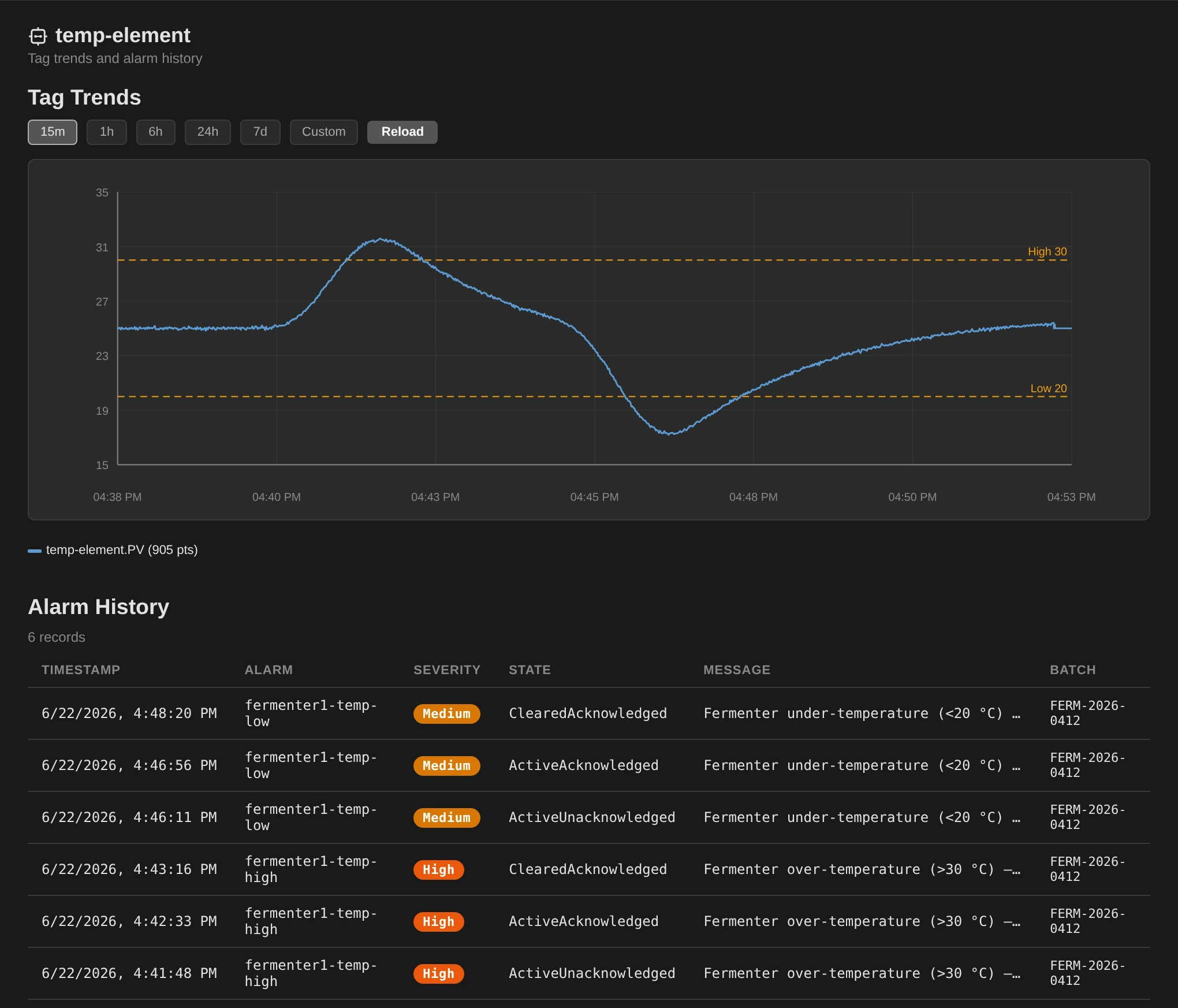
The Data app's control-module view for the temperature element, with a tag-trend chart of its process value over time above an alarm-history table of deviation alarms, each with a timestamp, severity, state, message, and the batch it belongs to.

In the Data view, a quality engineer reviews a control module's own trends and alarms

A tag-trend chart above an alarm history that names each alarm's batch

How it's different

On Emerson DeltaV, Siemens PCS 7, Rockwell PlantPAx, and Honeywell Experion, the plant model, its history, and its change record stay inside a proprietary stack. Cloud-Native DCS keeps them as Kubernetes objects your own tools can read.

Put the plant in Git

The plant's equipment, recipes, and control programs are plain text

See the change flow

Enforce the approved model

The platform reverts unapproved changes on its own

Watch drift corrected

Author logic in the browser

Any machine with a browser is an engineering workstation

See the editors

Point your AI at the live plant

The plant model is standard API objects, and one open API serves their live values

See the open API
Serving tier: API & operator UI replica autoscale Control tier: edge controllers controller-1 + controller

Elastic where it's safe, deterministic where it must be

The API and operator screens scale out on load, while one writer at a time drives each piece of equipment

See how it scales
Operator HMI Engineering Quality & data one plant model

Give every team one model

Operations, engineering, and quality work from the same live API objects

See the shared model
01

Put the plant in Git

Every change is reviewed and e-signed before it reaches production

The plant's equipment, recipes, and control programs are plain text, so the plant can live in your own Git, where each change is e-signed at Promote before it lands as a pull request. From there you can compare any two points in its history or roll back.

A traditional DCS keeps its version history inside the vendor's stack

The history is proprietary, separately licensed, and reachable only through the vendor's own software.

A change is made and rehearsed on a connected dev cluster, reviewed and e-signed at Promote, then the approved version lives in your own Git and deploys to the plant. A flow across two environments separated by a wall. In Develop, an engineer authors a recipe change in the browser and saves it to a connected dev cluster, where a simulated batch can show how it behaves. At Promote, between the environments, a reviewer reads the plant-language diff and applies an electronic signature and a second person approves. This is the review-of-record. On approval, in Production, the approved change is merged as a pull request into your own Git, where it is plain text under standard version control, and a GitOps pipeline deploys the merged version to the running plant. Develop (connected)ProductionAuthorin the browserDev clusterSave the changerun a sim batchReview & signthe review-of-recorde-signed, 2nd approverYour own Gitmerged as a PRplain text, standard GitRunning plantthe live versionSavePromoteon approvaldeploys
A change follows one path from dev cluster to production, gated at Promote
The two-file pull request that provisions an instrument, merged and live in the operator view, with the audit record carrying its commit Watch the full provisioning (1:37)
02

What's declared is what's running

Cloud-Native DCS redeploys the declared version on its own when a unit drifts

The platform compares every unit against its declared version every few seconds, so whether a given unit is running what was approved has a built-in answer. That declared version configures ten sites as readily as one.

A traditional DCS relies on a person to keep the live controller and the offline master copy in agreement

An engineer can edit logic directly on the live controller, and that change lives there until someone uploads it back to the master copy. The gap is well enough known that the DCS vendors and third parties sell separate change-management products whose only job is to periodically compare the two and flag the differences for a person to resolve.

Cloud-Native DCS reconciles the running plant to the declared model. A closed reconcile loop. At the top, the control module configuration (version 3) is the declared, desired state. At the bottom, the actual control logic running on its device, the agitator drive, also version 3, is the actual state. Down the right side the platform applies the declared configuration, and up the left side it observes the actual logic and re-applies on any drift. The platform sits at the centre of the loop, which runs continuously with no engineer in it. declared in version controlcontrol module configurationversion 3actual control logicversion 3version ???running on the agitator driveapplyobserveplatformre-applies on drift
The platform continuously reconciles the actual control logic to the declared configuration, re-applying it on any drift with no engineer in the loop
A terminal patching the declared scan interval out-of-band, beside the DriftCorrected record it leaves in the audit trail Watch the full drift correction with its audit record (0:37)
03

Author logic in the browser

Any machine with a browser is an engineering workstation

A new engineer starts with a browser and Git. The keys to the plant stop living in a license file taped to a workstation. The same editors run offline. Authoring on the engineer's own machine covers local development and air-gapped sites. The review and approval that makes a change the official record still goes through the connected promotion flow, so the compliance path is the same whether the work happened online or off.

A traditional DCS pins authoring to a licensed engineering station

On DeltaV, engineers author the plant's control logic in Emerson's own DeltaV Explorer and Control Studio.

How you author on Cloud-Native DCS, compared with a traditional DCS. Two panels. The top panel, Cloud-Native DCS in the accent color, shows authoring from any standard machine. A browser on any machine runs the Structured Text, Sequential Function Chart, and Function Block Diagram editors, and the engineer's own laptop runs the same editors offline with dcs edit against files in their own Git. The browser reaches a standard platform of Kubernetes and Git operated by your own IT. The bottom panel, a traditional DCS in grey, shows a fleet of vendor-licensed engineering workstations, each licensed station software on a specific Windows build and one of several to license, patch, and refresh. Those stations connect only to the vendor's proprietary stack, drawn sealed with a padlock, through the vendor's own software. Cloud-Native DCSAuthor from any standard machineBrowser, any machinethe ST · SFC · FBD editorsreachesStandard platformKubernetes + Gitoperated by your own ITYour own laptop, offlinedcs edit, the same editorsyour own Git, no clusterTraditional DCSA vendor-licensed engineering workstationEngineering stationa specific Windows buildreachesThe vendor's proprietary stackreached only through vendor softwareLicensed station software, license-locked to the machineOne of a fleet to license, patch, and refresh
On Cloud-Native DCS you author from a standard browser or your own laptop offline, while a traditional DCS uses a fleet of vendor-licensed engineering workstations
The same control module in the browser, edited as a function block diagram and read as live Structured Text Watch the full editing session (1:02)

A control engineer builds a new module template from an empty canvas

Blocks are dragged and wired on the canvas before one typed line of Structured Text grows the diagram a block the engineer never drew

A process engineer types a phase's control logic as Structured Text

The charge-and-confirm phase messages the operator and blocks on their acknowledgement, written with the editor's MESSAGE and PROMPT builtins

A new recipe version is created in the browser with its number and name assigned by the system

New Version on the effective recipe yields the next draft with procedure and parameters carried along

The same work runs offline, in the engineer's own editor and Git

A phase template is edited as plain text on the engineer's own machine and proposed from the command line into the same approval flow

04

AI-consumable by construction

The model is Kubernetes objects, its live values one open API

Every unit, recipe, running batch, and alarm in Cloud-Native DCS is a typed object in a Kubernetes API server, read with any Kubernetes client. Its live and historical values are served by the product's own gateway API, a versioned REST interface with a historian behind it. Both are interfaces that modern data, observability, and automation tooling already speaks. An open extraction layer ships, so there is none to build.

A traditional DCS needs a custom extraction per platform

On a traditional DCS, getting at the plant for an AI copilot, an analytics platform, or a digital twin means building a custom extraction per platform, against data copied out of the control system.

$ kubectl get batches -n site-plant-01
NAME          BATCHID          PHASE     MASTERRECIPE   AGE
batch-7kp2x   FERM-2026-0412   Running   bds-v2         2h14m
batch-9md4q   FERM-2026-0413   Running   bds-v2         8m

$ kubectl get batch batch-7kp2x -n site-plant-01 -o yaml
apiVersion: batch.dcs.io/v1alpha1
kind: Batch
metadata:
  name: batch-7kp2x
  namespace: site-plant-01
spec:
  batchID: FERM-2026-0412
  masterRecipeRef: bds-v2
  parameterOverrides:
  - name: targetTemperatureC
    value: "25"
  - name: fermentTime
    value: "120h"
status:
  phase: Running
  state: Running
  startTime: "2026-04-12T08:31:04Z"
  controlRecipeRef: batch-7kp2x-cr
  procedureRef: batch-7kp2x-proc
  allocatedUnits:
  - unitName: fermenter-1
    capability: ferment
    allocatedAt: "2026-04-12T08:31:04Z"
The plant's objects and their state, read as standard Kubernetes API objects with kubectl
The operator's HMI faceplate set to 180 RPM while the terminal read below returns the same value
05

Elastic where it's safe, deterministic where it must be

Exactly one writer at a time drives each piece of equipment

Cloud-Native DCS runs on Kubernetes, the system that decides how many copies of a service run and where. Kubernetes calls those copies replicas. Control works the other way. Two copies would race for the same reactor or valve, so a single writer keeps control deterministic.

A traditional DCS adds a separately licensed node for each function

A DeltaV plant licenses a ProfessionalPLUS, a Batch Executive, batch and continuous historians, and engineering and operator stations. That is its server layer. At the controller layer it grows the same way Cloud-Native DCS does, by adding controllers.

How Cloud-Native DCS scales, compared with a traditional DCS. Two panels, each drawn in two layers. The top panel shows Cloud-Native DCS: a serving tier of stacked, identical API and operator-UI replicas that scales out elastically on load, drawn in the accent color, and a control tier of distinct edge controllers that grows by adding more controllers. Control is never replicated for throughput, so there is one writer per piece of equipment. The bottom panel shows a traditional DCS in the same two layers. Its controller layer repeats the shape of the control tier, because it grows the same way, by adding controllers. Its server layer is a set of separate, generic nodes: a configuration server, a batch server, historians, an engineering station, and an operator station. Each is an individually licensed and patched image, physical or virtual. An open slot waits for the next licensed node. The figure draws its contrast at the server layer. Cloud-Native DCSServing tier: API & operator UIreplicaautoscale+ replicasScales out on loadControl tier: edge controllerscontroller-1+controllercontroller-2+controllerOne writer per piece of equipmentGrow by adding controllersTraditional DCSController layerProcesscontroller+controllerProcesscontroller+controllerThe controller layer grows the same wayin both systems: by adding controllersServer layer: a separately licensed node per functionConfigurationserverBatch serverHistoriansEngineeringstationOperatorstation+licensed nodePhysical or virtual: each individually licensedand patched, with its own overhead
Cloud-Native DCS scales its serving tier by adding replicas and its edge by adding controllers, one writer per piece of equipment, while a traditional DCS licenses a server node per function
06

Give every team one model

The quality record and the operator's live screen cannot disagree

There is no second copy to reconcile. A change to the plant reaches every team the moment it lands.

A traditional DCS gives downstream teams a historian copy, with a second model to keep aligned

On a traditional DCS, downstream teams usually read a separate process historian, commonly OSIsoft/AVEVA PI, that the control system streams its tags into. Its own model of the plant has to track every change.

One shared plant model, compared with a traditional DCS and its separate historian copy. Two panels. The top panel shows Cloud-Native DCS with three views: operator HMI, engineering, and quality and data. Each connects down to a single shared plant-model box, the one source of truth. The bottom panel shows a traditional DCS: a control system streams tags into a separate historian-copy box that keeps its own re-created plant hierarchy, and the downstream quality and data team reads from that copy. Cloud-Native DCSOperator HMIEngineeringQuality & dataone plantmodelOne source of truthEvery view reads the same objectsTraditional DCSControl systemtags streamedHistorian copyre-created hierarchyread-onlyQuality & dataDownstream teams read a separate historian copy,with its own plant model to keep aligned
Every team reads one live plant model, while a traditional DCS gives downstream teams a separate historian copy with a plant model of its own